
Jump To Steal An Egg Controls
PC, mobile, and console inputs for steal, jump, and Pen management.
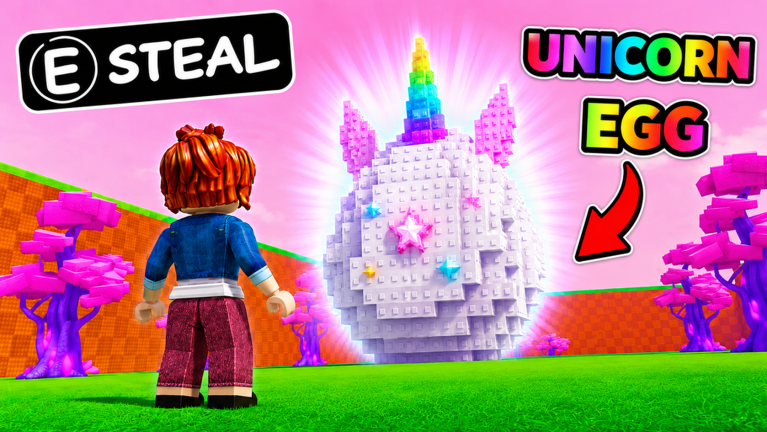
Jump To Steal An Egg uses standard Roblox movement plus a proximity steal. Official screenshots show an E STEAL prompt on a Unicorn Egg. If that prompt never appears, you are too far from the nest, another player already picked it up, or you are looking at a decorative egg.
This page is the input sheet. Strategy lives in how to steal and getting started.
PC controls
| Action | Input |
|---|---|
| Move | WASD |
| Jump | Space |
| Camera | Right mouse drag, or Shift lock |
| Steal egg | E when the prompt shows |
| Drop held egg | The on-screen drop / unequip control (do not jump into a void hoping it counts) |
| Open menus | HUD buttons for Pen, shop, and trade |
Shift lock helps on narrow brick stairs like the T-Rex pyramid in official art. If you camera-spin while holding an egg, you will walk off the studs. Practice a straight jump on a low nest before you try a cobra platform.
Mobile and tablet
| Action | Input |
|---|---|
| Move | Left thumb stick |
| Jump | Jump button |
| Camera | Right-side drag |
| Steal | On-screen Steal / proximity button when you are on the nest |
Thumb overlap is the usual failure. Keep jump on the right and steal as a tap, not a swipe. If the steal button never lights, you are not on the nest collider. Walk onto the studs, then tap.
Console
Roblox maps jump to A/X and interact to the proximity button the experience binds. Use the on-screen prompt, not a guessed face button from another tycoon. If E is shown in a trailer, console still uses the highlighted HUD control.
Steal timing
The prompt is not a magnet. You must be on the nest. Jumping past the egg at full Jump will skip the collider and waste the run. Land, wait a beat, steal, then leave. The steal guide covers guardian paths after the pickup.
If you steal and immediately jump the wrong way, drop is better than a death with the egg if the nest is still empty. A dropped egg on a five-player server is a gift. Ping your route before you panic-drop in spawn.
Pen and hatch inputs
Hatch slots are world prompts, not a hidden hotkey. Walk to an empty slot, place the egg, and wait. After hatch, place the pet in the Pen the same way. Offline income only starts when the pet is placed. See hatch pets.
Trading inputs
Trading uses the in-experience trade UI against another player in the same five-player server. There is no mailbox. Stand near the player, send the request, confirm both sides. Trading has the etiquette. Do not use chat-only “trust trades.”
Common input problems
- Steal does nothing: another player took it, or you are on the wrong collider. Reposition.
- Jump feels short: that is the stat, not a broken bind. Raise Jump in Jump power.
- Mobile jump plus steal misfires: lift the stick before you tap Steal.
- Camera inside a brick wall: zoom out; stud pyramids clip first-person cameras.
Accessibility: Roblox’s own shift lock, camera sensitivity, and touch UI scale all work. This game does not add a unique remap menu beyond the default Roblox settings.
Related
First session: getting started. After inputs feel fine, steal with a plan in how to steal eggs. Keyboard users who still miss nests should look at Jump, not binds.
Frequently Asked Questions
Quick answers for Jump To Steal An Egg on Roblox.
What button steals an egg in Jump To Steal An Egg?
E on PC when the Steal prompt appears. Mobile uses the on-screen Steal button. Console uses the highlighted proximity control.
Does Jump To Steal An Egg support mobile?
Yes. Roblox mobile and tablet can play the full loop. Keep jump and steal as separate taps so you do not hop off the nest.
Why is there no steal prompt?
You are not close enough, the egg is gone, or you are in a different experience. Confirm place 106383201135975 and stand on the nest studs.